
Your Cart is empty
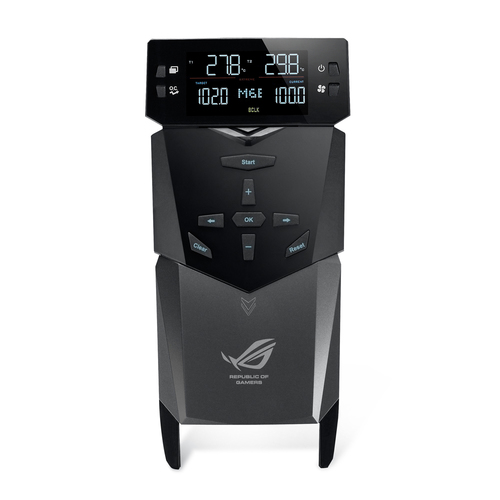
ASUS OC Panel fan speed controller 4 channels 2.6" LCM Black
ASUS OC Panel fan speed controller 4 channels 2.6" LCM Black
SKU : OC PANEL
ASUS OC Panel fan speed controller 4 channels 2.6" LCM Black
Manufacturer part number :
OC PANEL
Vendor
:
ASUS
$99.00
Description
Overclocking command center
- OC Panel - Overclocking Command Center
- Subzero Sense - Find out how cold your board is
- VGA Hotwire - Hotwire your system
- EXTREME Mode for subzero OC benching
- NORMAL Mode for in-chassis usage
Overclocking command center
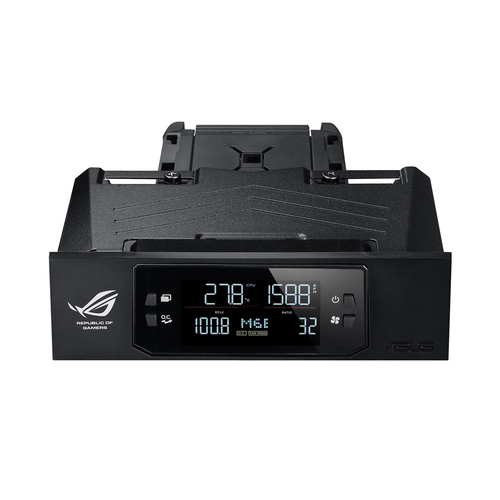
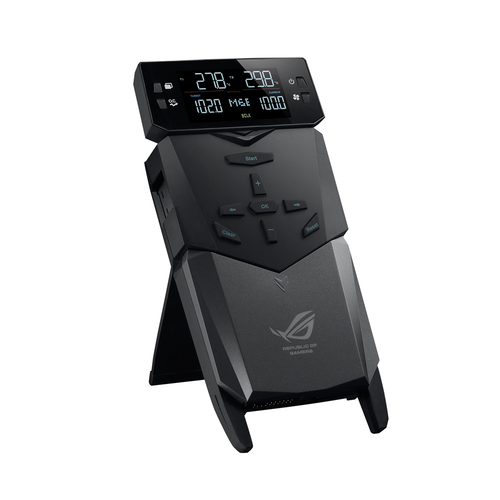
Get your hands on real-time system monitoring and tweaking in two modes. Normal Mode has OC Panel inside the case, while in Extreme Mode it works as an external console. For both, its clear 2.6” display keeps you fully informed and in control of maximum available power.
Easy system monitoring and boosting
Install OC Panel in your PC case easily, as it fits any 5.25” drive bay. When used this way, it operates in Normal Mode, perfect for hardcore gaming and standard overclocking. It shows dynamic CPU temps, ratios, base clocks, and fan RPM info. You can also use one-click instant CPU Level Up, which has two speed boost presets. For cooling, select Turbo, Standard, and Silent CPU fan modes as needed.
Overclocking made this easy
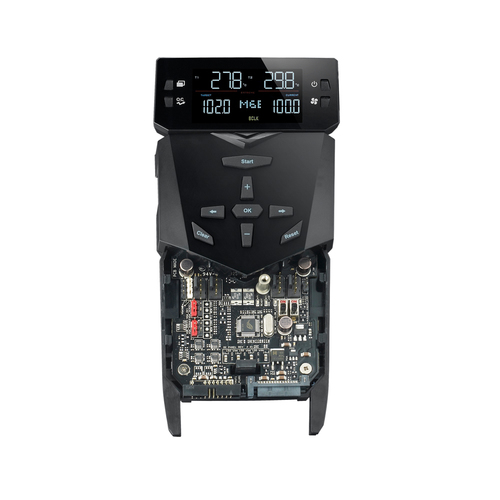
OC Panel can be used as an external overclocking console, integrating many overclocker-appreciated hardcore features. These include Subzero Sense, VGA SMB, VGA Hotwire, four 4-pin fan headers, Slow Mode, Pause Switch, and multiple parameter tuning. All settings adjustable real-time and quickly applied through easy-reach control buttons.
Integrated Subzero Sense and VGA Hotwire give you super-cool liquid thermal temp readings and field access to streamlined hardware-level GPU overvolting right on the 2.6” display. Easily read current values and set targets on-the-fly, so power comes easy!
Works in just a few steps
In both Normal and Extreme Modes, OC Panel is super-easy to install. Start enjoying its amazing capabilities with a few simple steps.
- OC Panel - Overclocking Command Center
- Subzero Sense - Find out how cold your board is
- VGA Hotwire - Hotwire your system
- EXTREME Mode for subzero OC benching
- NORMAL Mode for in-chassis usage
Overclocking command center
Get your hands on real-time system monitoring and tweaking in two modes. Normal Mode has OC Panel inside the case, while in Extreme Mode it works as an external console. For both, its clear 2.6” display keeps you fully informed and in control of maximum available power.
Easy system monitoring and boosting
Install OC Panel in your PC case easily, as it fits any 5.25” drive bay. When used this way, it operates in Normal Mode, perfect for hardcore gaming and standard overclocking. It shows dynamic CPU temps, ratios, base clocks, and fan RPM info. You can also use one-click instant CPU Level Up, which has two speed boost presets. For cooling, select Turbo, Standard, and Silent CPU fan modes as needed.
Overclocking made this easy
OC Panel can be used as an external overclocking console, integrating many overclocker-appreciated hardcore features. These include Subzero Sense, VGA SMB, VGA Hotwire, four 4-pin fan headers, Slow Mode, Pause Switch, and multiple parameter tuning. All settings adjustable real-time and quickly applied through easy-reach control buttons.
Integrated Subzero Sense and VGA Hotwire give you super-cool liquid thermal temp readings and field access to streamlined hardware-level GPU overvolting right on the 2.6” display. Easily read current values and set targets on-the-fly, so power comes easy!
Works in just a few steps
In both Normal and Extreme Modes, OC Panel is super-easy to install. Start enjoying its amazing capabilities with a few simple steps.
- 4 channels
- Built-in display 2.6" LCM
- Black
Specifications
Performance
Product Type
OC Panel
Alternative Products
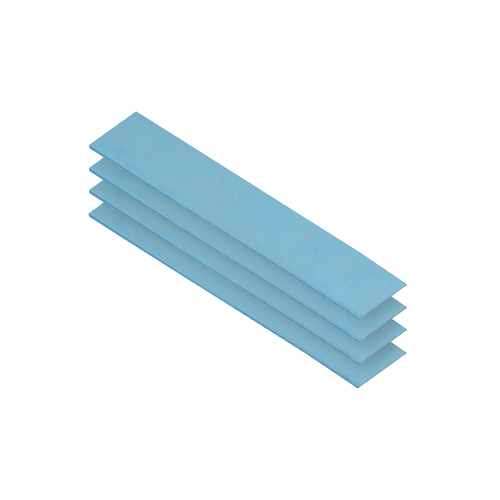
ARCTIC TP-3 heat sink compound Thermal pad
ACTPD00055A
ARCTIC TP-3, Thermal pad, Blue, 4.72" (120 mm), 0.787" (20 mm), 0.0197" (0.5 mm), 4 pc(s)
Loading price
or
Loading price
/mo
Call For Availability
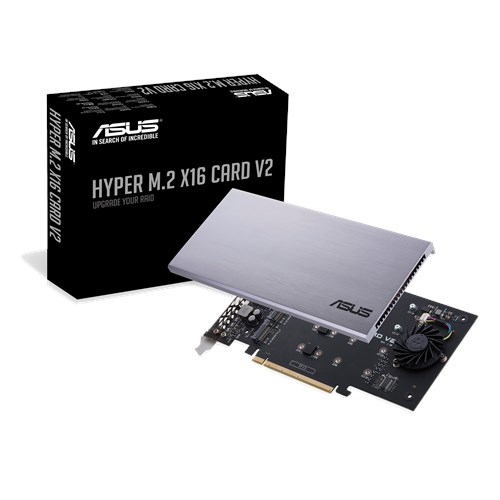
ASUS HYPER M.2 X16 CARD V2 interface cards/adapter Internal
HYPER M.2 X16 CARD V2
ASUS HYPER M.2 X16 CARD V2, PCIe, M.2, PCIe 3.0, 128 Gbit/s, 7.95" (202 mm), 0.512" (13 mm)
Loading price
or
Loading price
/mo
Call For Availability
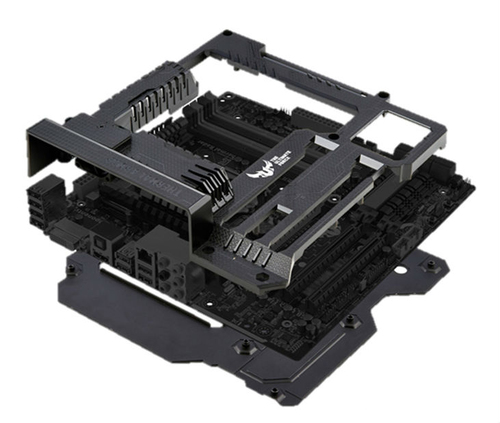
ASUS Gryphon Armor Kit Universal Motherboard tray
GRYPHON ARMOR KIT
ASUS Gryphon Armor Kit, Universal, Motherboard tray, Black, Z87
Loading price
or
Loading price
/mo
Call For Availability
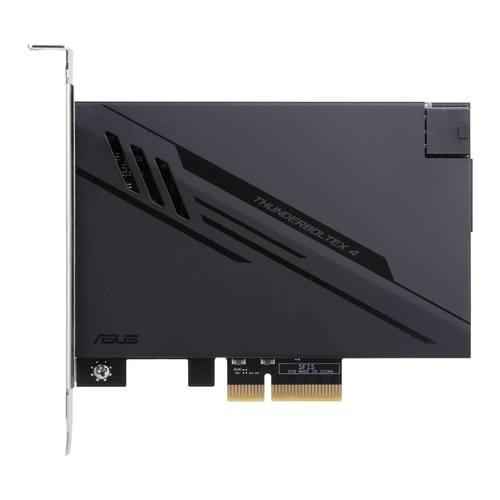
ASUS ThunderboltEX 4 interface cards/adapter Internal Mini DisplayPort, PCIe, Thunderbolt,...
THUNDERBOLTEX 4
ASUS ThunderboltEX 4, PCIe, Mini DisplayPort, PCIe, Thunderbolt, USB 2.0, USB 3.2 Gen 2 (3.1 Gen 2),
Loading price
or
Loading price
/mo
Call For Availability
Description
Overclocking command center
- OC Panel - Overclocking Command Center
- Subzero Sense - Find out how cold your board is
- VGA Hotwire - Hotwire your system
- EXTREME Mode for subzero OC benching
- NORMAL Mode for in-chassis usage
Overclocking command center
Get your hands on real-time system monitoring and tweaking in two modes. Normal Mode has OC Panel inside the case, while in Extreme Mode it works as an external console. For both, its clear 2.6” display keeps you fully informed and in control of maximum available power.
Easy system monitoring and boosting
Install OC Panel in your PC case easily, as it fits any 5.25” drive bay. When used this way, it operates in Normal Mode, perfect for hardcore gaming and standard overclocking. It shows dynamic CPU temps, ratios, base clocks, and fan RPM info. You can also use one-click instant CPU Level Up, which has two speed boost presets. For cooling, select Turbo, Standard, and Silent CPU fan modes as needed.
Overclocking made this easy
OC Panel can be used as an external overclocking console, integrating many overclocker-appreciated hardcore features. These include Subzero Sense, VGA SMB, VGA Hotwire, four 4-pin fan headers, Slow Mode, Pause Switch, and multiple parameter tuning. All settings adjustable real-time and quickly applied through easy-reach control buttons.
Integrated Subzero Sense and VGA Hotwire give you super-cool liquid thermal temp readings and field access to streamlined hardware-level GPU overvolting right on the 2.6” display. Easily read current values and set targets on-the-fly, so power comes easy!
Works in just a few steps
In both Normal and Extreme Modes, OC Panel is super-easy to install. Start enjoying its amazing capabilities with a few simple steps.
- OC Panel - Overclocking Command Center
- Subzero Sense - Find out how cold your board is
- VGA Hotwire - Hotwire your system
- EXTREME Mode for subzero OC benching
- NORMAL Mode for in-chassis usage
Overclocking command center
Get your hands on real-time system monitoring and tweaking in two modes. Normal Mode has OC Panel inside the case, while in Extreme Mode it works as an external console. For both, its clear 2.6” display keeps you fully informed and in control of maximum available power.
Easy system monitoring and boosting
Install OC Panel in your PC case easily, as it fits any 5.25” drive bay. When used this way, it operates in Normal Mode, perfect for hardcore gaming and standard overclocking. It shows dynamic CPU temps, ratios, base clocks, and fan RPM info. You can also use one-click instant CPU Level Up, which has two speed boost presets. For cooling, select Turbo, Standard, and Silent CPU fan modes as needed.
Overclocking made this easy
OC Panel can be used as an external overclocking console, integrating many overclocker-appreciated hardcore features. These include Subzero Sense, VGA SMB, VGA Hotwire, four 4-pin fan headers, Slow Mode, Pause Switch, and multiple parameter tuning. All settings adjustable real-time and quickly applied through easy-reach control buttons.
Integrated Subzero Sense and VGA Hotwire give you super-cool liquid thermal temp readings and field access to streamlined hardware-level GPU overvolting right on the 2.6” display. Easily read current values and set targets on-the-fly, so power comes easy!
Works in just a few steps
In both Normal and Extreme Modes, OC Panel is super-easy to install. Start enjoying its amazing capabilities with a few simple steps.
- 4 channels
- Built-in display 2.6" LCM
- Black
Specifications
Performance
Product Type
OC Panel
Alternative Products
ARCTIC TP-3 heat sink compound Thermal pad
ACTPD00055A
ARCTIC TP-3, Thermal pad, Blue, 4.72" (120 mm), 0.787" (20 mm), 0.0197" (0.5 mm), 4 pc(s)
Loading price
or
Loading price
/mo
Call For Availability
ASUS HYPER M.2 X16 CARD V2 interface cards/adapter Internal
HYPER M.2 X16 CARD V2
ASUS HYPER M.2 X16 CARD V2, PCIe, M.2, PCIe 3.0, 128 Gbit/s, 7.95" (202 mm), 0.512" (13 mm)
Loading price
or
Loading price
/mo
Call For Availability
ASUS Gryphon Armor Kit Universal Motherboard tray
GRYPHON ARMOR KIT
ASUS Gryphon Armor Kit, Universal, Motherboard tray, Black, Z87
Loading price
or
Loading price
/mo
Call For Availability
ASUS ThunderboltEX 4 interface cards/adapter Internal Mini DisplayPort, PCIe, Thunderbolt,...
THUNDERBOLTEX 4
ASUS ThunderboltEX 4, PCIe, Mini DisplayPort, PCIe, Thunderbolt, USB 2.0, USB 3.2 Gen 2 (3.1 Gen 2),
Loading price
or
Loading price
/mo
Call For Availability
OC PANEL
ASUS OC Panel fan speed controller 4 channels 2.6" LCM Black
Overclocking command center- OC Panel - Overclocking Command Center
- Subzero Sense - Find out how cold your board is
- VGA Hotwire - Hotwire your system
- EXTREME Mode for subzero OC benching
- NORMAL Mode for in-chassis usage
Overclocking command center
Get your hands on real-time system monitoring and tweaking in two modes. Normal Mode has OC Panel inside the case, while in Extreme Mode it works as an external console. For both, its clear 2.6” display keeps you fully informed and in control of maximum available power.
Easy system monitoring and boosting
Install OC Panel in your PC case easily, as it fits any 5.25” drive bay. When used this way, it operates in Normal Mode, perfect for hardcore gaming and standard overclocking. It shows dynamic CPU temps, ratios, base clocks, and fan RPM info. You can also use one-click instant CPU Level Up, which has two speed boost presets. For cooling, select Turbo, Standard, and Silent CPU fan modes as needed.
Overclocking made this easy
OC Panel can be used as an external overclocking console, integrating many overclocker-appreciated hardcore features. These include Subzero Sense, VGA SMB, VGA Hotwire, four 4-pin fan headers, Slow Mode, Pause Switch, and multiple parameter tuning. All settings adjustable real-time and quickly applied through easy-reach control buttons.
Integrated Subzero Sense and VGA Hotwire give you super-cool liquid thermal temp readings and field access to streamlined hardware-level GPU overvolting right on the 2.6” display. Easily read current values and set targets on-the-fly, so power comes easy!
Works in just a few steps
In both Normal and Extreme Modes, OC Panel is super-easy to install. Start enjoying its amazing capabilities with a few simple steps.
- 4 channels
- Built-in display 2.6" LCM
- Black
Technical specifications
Performance
Product Type
OC Panel
Alternative Products
ARCTIC TP-3 heat sink compound Thermal pad
ACTPD00055A
ARCTIC TP-3, Thermal pad, Blue, 4.72" (120 mm), 0.787" (20 mm), 0.0197" (0.5 mm), 4 pc(s)
Loading price
or
Loading price
/mo
Call For Availability
ASUS HYPER M.2 X16 CARD V2 interface cards/adapter Internal
HYPER M.2 X16 CARD V2
ASUS HYPER M.2 X16 CARD V2, PCIe, M.2, PCIe 3.0, 128 Gbit/s, 7.95" (202 mm), 0.512" (13 mm)
Loading price
or
Loading price
/mo
Call For Availability
ASUS Gryphon Armor Kit Universal Motherboard tray
GRYPHON ARMOR KIT
ASUS Gryphon Armor Kit, Universal, Motherboard tray, Black, Z87
Loading price
or
Loading price
/mo
Call For Availability
ASUS ThunderboltEX 4 interface cards/adapter Internal Mini DisplayPort, PCIe, Thunderbolt,...
THUNDERBOLTEX 4
ASUS ThunderboltEX 4, PCIe, Mini DisplayPort, PCIe, Thunderbolt, USB 2.0, USB 3.2 Gen 2 (3.1 Gen 2),
Loading price
or
Loading price
/mo
Call For Availability
Alternative Products
Complete Your Collection with These Popular Picks!
ARCTIC TP-3 heat sink compound Thermal pad
ACTPD00055A
ARCTIC TP-3, Thermal pad, Blue, 4.72" (120 mm), 0.787" (20 mm), 0.0197" (0.5 mm), 4 pc(s)
Loading price
or
Loading price
/mo
Call For Availability
ASUS HYPER M.2 X16 CARD V2 interface cards/adapter Internal
HYPER M.2 X16 CARD V2
ASUS HYPER M.2 X16 CARD V2, PCIe, M.2, PCIe 3.0, 128 Gbit/s, 7.95" (202 mm), 0.512" (13 mm)
Loading price
or
Loading price
/mo
Call For Availability
ASUS Gryphon Armor Kit Universal Motherboard tray
GRYPHON ARMOR KIT
ASUS Gryphon Armor Kit, Universal, Motherboard tray, Black, Z87
Loading price
or
Loading price
/mo
Call For Availability
ASUS ThunderboltEX 4 interface cards/adapter Internal Mini DisplayPort, PCIe, Thunderbolt,...
THUNDERBOLTEX 4
ASUS ThunderboltEX 4, PCIe, Mini DisplayPort, PCIe, Thunderbolt, USB 2.0, USB 3.2 Gen 2 (3.1 Gen 2),
Loading price
or
Loading price
/mo
Call For Availability